Candy AI chat is a text chat with adult AI characters. Each one has a profile, an opening line and scene buttons for pictures and clips. You start on a free account. Premium adds unlimited text messages, voice notes and photo requests, and it includes 100 tokens every month. A 5-second scene video costs 12 tokens. The full prices are in the pricing guide.
How a chat starts once you pick a character
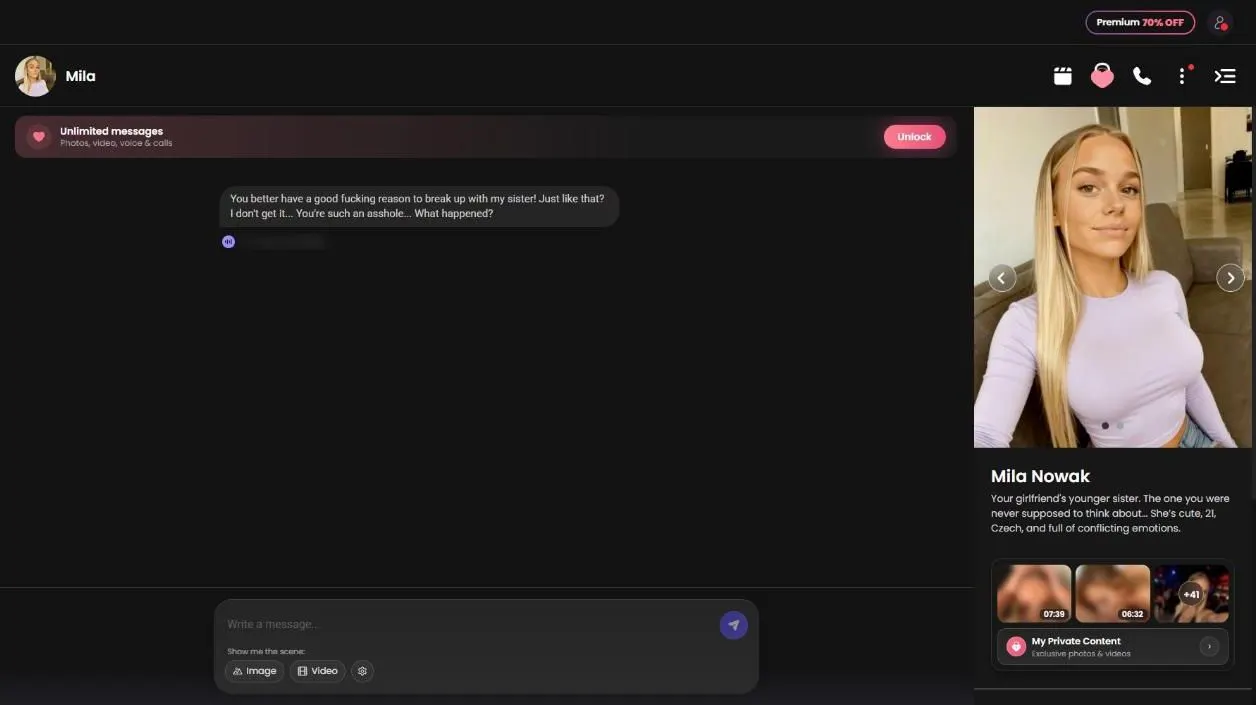
Candy AI chat starts the moment you open a character. Her profile loads and the conversation opens with her own first line, so you never face an empty box. I saw no separate setup step between the profile and the chat. On a free account, I opened Mila Nowak, who is 21, and her opener was a pointed line about a breakup with her sister. That is the tone she starts with.
Mila is also one of the most-cast characters in Candy Shorts, appearing in six series. If you want to see where she shows up, her character page lists the shows. Reading her opener first is a quick way to decide whether she is worth your time.
What the browse grid lets you filter
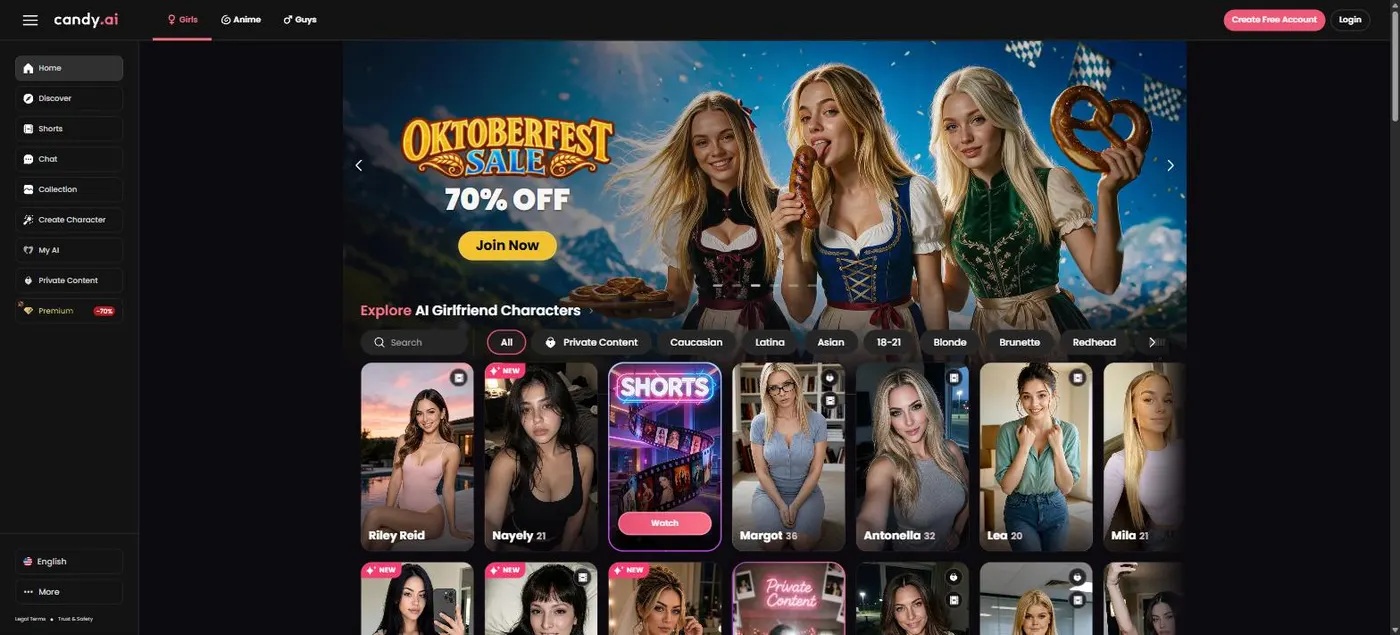
The Girls tab is a grid of character cards. Each card shows a name and an age, a search box sits above the grid, and the filters narrow what you see. You can filter by Private Content, by ethnicity (Caucasian, Latina, Asian and more), by age range such as 18–21, and by hair color (Blonde, Brunette, Redhead and more). Use the filters before you scroll. It is quicker, and it stops you opening profiles you won’t use.
Two tiles sit among the cards, one for Shorts and one for Private Content, so you can jump straight to either side. Girls is one of three categories, with Anime and Guys beside it.
Every profile lists age, body, ethnicity, language, relationship, occupation, hobbies and personality. Read that list before you pick. It is the closest thing Candy gives you to a character brief.
Free account versus Premium inside the chat
A free account can open chats, but the chat keeps pitching Premium. A banner promises unlimited messages, photos, video, voice and calls, with an Unlock button. Each feature you tap, from Image to phone calls, opens its own upgrade prompt with a list of Premium perks.
Premium gives you unlimited text messages, voice notes, photo requests and 100 tokens each month. The same tokens pay for locked Shorts episodes, so your monthly allowance has to cover chat extras and episodes alike. The annual plan is $3.99 a month, billed $47.88 a year, which is about 13 cents a day. The three-month plan is $8.99 a month, billed $26.97. The monthly plan is $13.99.
Premium renews automatically at the same price and term. You can cancel in settings at any time, so if you only wanted one month, cancel before the next renewal.
Scene buttons: Image and Video in the chat
The chat bar offers a scene option with two buttons, Image and Video. Image asks for a picture of the moment you’re in. Video asks for a clip. Neither one replaces the text. They add a visual beat to a conversation you are already having.
The video button produces a Scene Video, a five-second clip of the exact moment, and it costs 12 tokens. On a free account, tapping Video brings up the upgrade prompt instead of a clip. Image follows the same pattern, and both features sit on Premium’s list.
For the details on each button, read the AI video guide. A simple test works here: if a character’s tone wins you over, the scene buttons are your next step. If it doesn’t, you have saved your tokens.
Header icons: Shorts, Private Content and calls
Four icons sit in the chat header: Shorts, Private Content, phone call and the profile panel. Open the profile panel first, because it previews her Private Content packs before you spend anything.
Mila’s panel shows two packs, and each costs 290 tokens. One has a 7:39 video and 23 photos, rated 92 percent. The other has a 6:32 video and 19 photos, rated 94 percent. Unlocked content goes into your gallery automatically. At 290 tokens a pack, one purchase is almost three months of Premium’s 100-token allowance, so budget before you tap.
The phone icon opens calls, which are in beta and cost 3 tokens a minute. The AI phone call guide has the details, and the Private Content guide explains how packs work.
Who should chat, and who should wait
Start on a free account. Open two or three characters, read their opening lines and see whether the voice suits you.
If you plan to chat most days, the annual plan is the cheaper route. Twelve monthly payments at $13.99 come to $167.88, against $47.88 for the annual plan. Watch the tokens, though. Packs and Scene Videos draw on the same monthly allowance as locked episodes. Set a token budget for the month before you start, and stop when you reach it.
Wait if all you want is one picture or one clip today. A free account can’t generate either one, and Premium is the price of entry for both.
Group chats and what this guide leaves out
The chat list has a New Group button, so group chats exist on Candy. This guide doesn’t explain how they work, because I haven’t checked their rules and would rather not guess.
It also skips the detail of phone calls and private packs, which have their own guides. Most Shorts series end by handing you to a chat with the lead character, so the two sides meet at the end of an episode. If you came for the shows, start with the free episodes guide. If you want to build a character rather than chat with one, the create character guide covers that path.
Strengths
- You can start chatting on a free account.
- Each profile lists age, body, ethnicity, language, relationship, occupation, hobbies and personality.
- Chats open with the character’s own first line.
- Most Shorts series hand you to a chat with the lead character when they end.
Limits
- Unlimited texts, voice notes and photo requests are Premium-only.
- Private Content packs cost 290 tokens each on Mila’s profile, nearly three months of Premium tokens.
- Premium renews automatically at the same price, so set a reminder before it does.