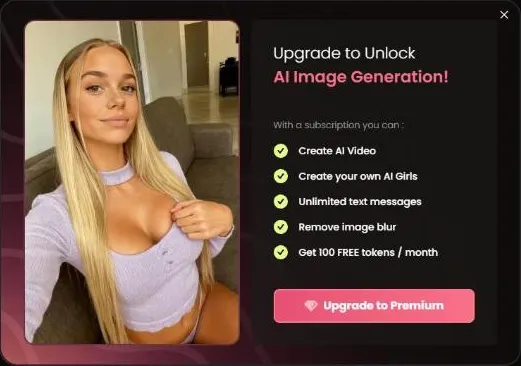
Candy AI’s image generator makes AI pictures, and Candy lists it as a Premium benefit for 18+ image generation. On a free account, the Image button in a chat opens an upgrade prompt instead. Premium also includes removing image blur and 100 tokens a month. I did not confirm the per-image token cost, so this guide doesn’t quote one. Plan prices are in the pricing guide.
Three ways into the image generator
Candy AI’s image generator has three entry points. The standalone Generate Image tool is the first. A version of that tool starts from a character, so you choose her before you generate anything. The third is inside a chat, where the Image option in the scene bar asks for a picture of the moment you’re in.
All three sit behind Premium. The entry point changes how you start, but it doesn’t change whether you need a paid plan. If a chat is already open, the chat route is the shortest path, and the AI girlfriend chat guide explains how those chats begin.
Pick the route that matches what you already know. A character you have in mind points to the character route, and a moment in a chat points to the chat button.
What a free account sees when it taps Image
Tapping Image in a chat on a free account opens a prompt, not a picture. The prompt lists what Premium includes: AI video generation, custom AI girls, unlimited text messages, removing image blur and 100 tokens a month. Each item is locked until you pay.
The list tells you two things. Image generation sits in the paid tier, and blur removal is a Premium perk, which means the free side keeps the blur. If you were hoping for a free sample, the prompt is what you get instead.
Read the list as a feature map, not a discount. The items are grouped to sell the plan, and they all come with the same Premium subscription, whichever length you choose.
What Premium adds for images, and what it costs
Three Premium benefits matter for images: Generate 18+ Images, Create your own AI Girlfriend(s) and 100 tokens a month. Unlimited text messages sit on the same list, so one plan covers chat and pictures. Image generation isn’t the only item on that list, so weigh the other perks before you pay.
The annual plan is $3.99 a month, billed $47.88 a year, which works out to about 13 cents a day. The three-month plan is $8.99 a month, billed $26.97. The monthly plan is $13.99. Premium renews automatically at the same price and term, and you can cancel in settings at any time.
If you want images every week, the annual plan is the cheaper route. Twelve monthly payments at $13.99 come to $167.88, against $47.88 for the year. If you only want to test once, the monthly plan is the one that matches a single month.
Starting from a character
The character route is useful when you already know who you want. Start from her profile and use the details it lists, such as age, body, ethnicity and personality, to decide what to ask for. Those fields are the nearest thing the profile offers to a brief.
Mila Nowak is a useful example. Her profile lists her at 21, and she appears in six series, so you can check the shows before you pick her. The profile also previews her Private Content, which is a separate purchase from anything you generate. Her hobbies and personality, listed on the same profile, can help you choose the scene you want.
Where generated images end up, and Private Content
Generated media is saved to your Collection, the gallery for media you generated or unlocked. Candy says media deleted from a chat stays in your gallery, so clearing a conversation won’t empty what you made.
Private Content is a different thing. Those are photo and video packs made for a character, and they cost tokens rather than being generated on request. Mila’s two packs cost 290 tokens each, which is nearly three months of Premium’s allowance. Read the Private Content guide before you compare the two.
Unlocked packs also land in your gallery automatically, so the Collection is the place to check for both kinds of media.
Budgeting images once you see the price
I did not confirm the per-image token price, so I can’t give you a number. The method is simple, and it works as soon as you see the cost inside the tool. Divide 100 by the per-image price to get the number of images your monthly allowance covers. Then subtract any Scene Videos or locked episodes you plan to buy from the same 100 tokens.
For comparison, a Scene Video costs 12 tokens, so the monthly allowance covers eight of them with 4 left over. Any image priced above 12 tokens means fewer than eight in the same month. A rough check: at 6 tokens an image, the allowance covers about sixteen; at 25 tokens, it covers four.
Set a cap before you start. Pick a monthly token budget you’re comfortable with, and stop when you reach it, whatever the feature.
What I could not confirm, and what to read first
I only saw this feature through the free account’s prompt. My verdict is based on what Candy shows there and on the Premium list, not on a finished image from the tool. I also did not confirm the full settings inside the generator, or how many images a month you get beyond the 100-token allowance.
Before you generate anything, read Candy’s age rules, Content Removal Policy and Community Guidelines. Candy publishes all three, and they are the rules that apply to the tools.
For the video side of the same feature set, the AI video guide covers Scene Videos. The series hub shows the episodic side of the site, which is pre-made and works differently.
Strengths
- The Image button sits inside the chat, so you don’t leave the conversation.
- Premium covers images, AI video and custom characters under one plan.
- Generated media lands in your Collection, so it stays in one gallery.
- A character route lets you start from a profile you already like.
Limits
- A free account gets only the upgrade prompt, so there is no free test.
- The per-image token price is not confirmed in this guide.
- Removing image blur is a Premium perk, not a free setting.